LinkedIn has become a key resource for college students due to the transition from traditional paper resumes to dynamic digital portfolios. Your feed on social media sites like Instagram showcases travel and personal achievements. LinkedIn works on a completely different level. You can see which courses your classmates are taking, where they are doing internships, and which businesses are actively recruiting in real time, so it becomes your digital resume today.
Recruiters use LinkedIn’s backend search engine to actively find prospects rather than passively waiting for applications. You can transition from outbound job hunting, sending hundreds of resumes into the void, to inbound opportunity generation, recruiters finding you based on your skills, by building a strong profile from the beginning.
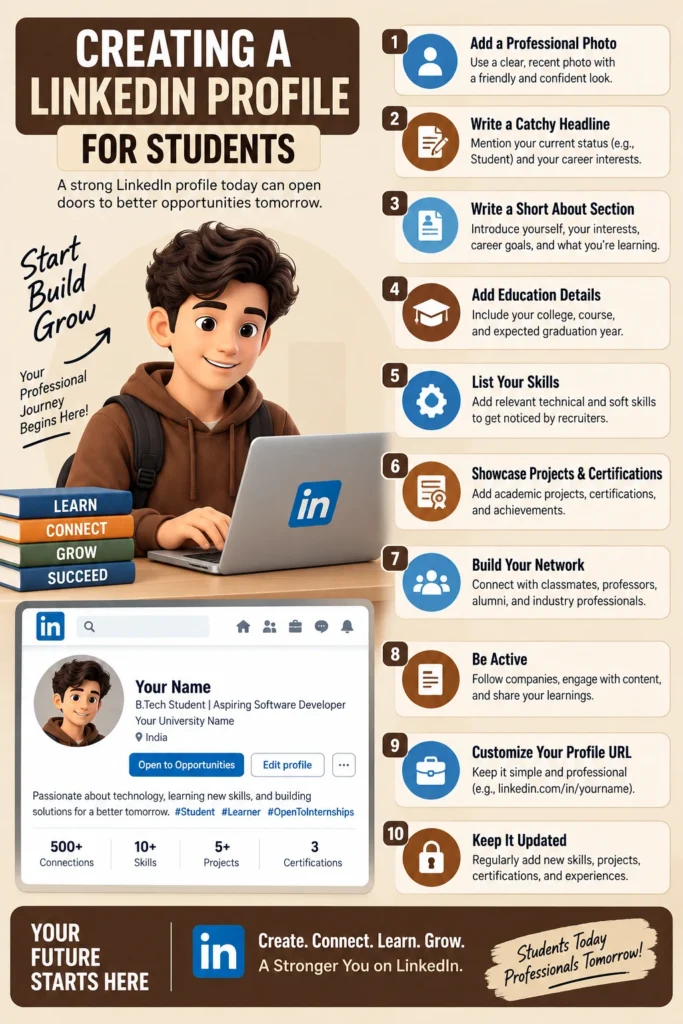
In order to help you get internships, network with industry leaders, and get your first full-time job, this complete guide sets out the exact anatomy of a remarkable student profile, incorporating the most recent 2026 algorithm changes, character limitations, and search engine optimization (SEO) strategies.
Why is LinkedIn Important for College Students?
LinkedIn serves as a powerful digital springboard for college students, bridging the gap between academic life and the professional world. It transforms a standard paper resume into a dynamic, 24/7 personal brand that helps students build a professional network long before graduation.
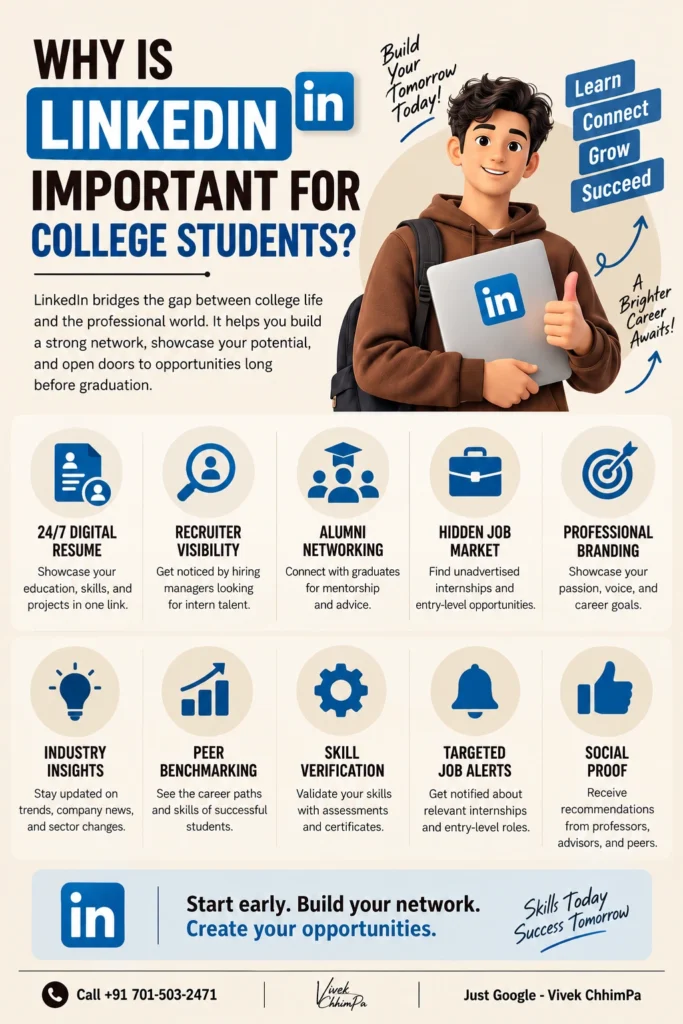
- 24/7 Digital Resume: Hosts your education, skills, and projects in one accessible link.
- Recruiter Visibility: Puts your profile in front of hiring managers actively sourcing intern talent.
- Alumni Networking: Connects you with graduates from your university for mentorship and advice.
- Hidden Job Market: Unlocks unadvertised internship and entry-level career opportunities.
- Professional Branding: Allows you to showcase your academic passion, voice, and career goals.
- Industry Insights: Keeps you updated on market trends, company news, and sector changes.
- Peer Benchmarking: Helps you see the career paths and skills of successful students in your field.
- Skill Verification: Validates your technical knowledge through built-in assessments and certificates.
- Targeted Job Alerts: Notifies you the moment relevant internships or entry-level roles open up.
- Social Proof: Displays public recommendations from professors, advisors, and peers to build trust.
Step-by-Step: Creating a LinkedIn Profile for Students
Here is a detailed step-by-step guide for students to build a strong and effective LinkedIn profile, in the following key points:
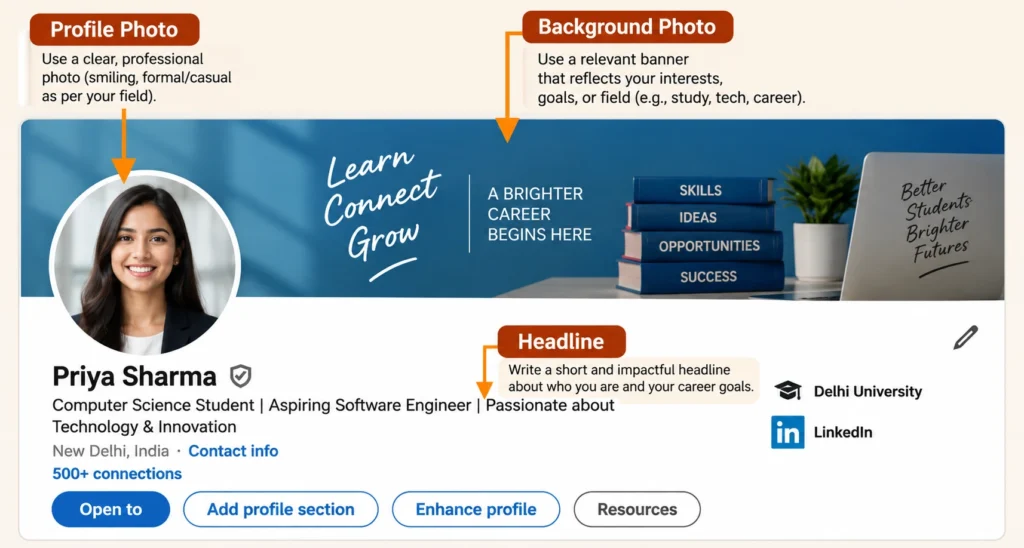
Visuals and Profile Basics
- Before a recruiter reads a single word of your experience, they scan your profile visually.
The Profile Picture
- Your digital first impression is determined by your profile picture.
- Make sure your face covers around 60% of the frame, stand facing a window for sunlight, and dress professionally or in smart-casual outfits suitable for your preferred business. Stay away from distracting backdrops, large filters, and group photographs.
The Custom Banner (Cover Image)
- An incomplete profile is shown by the default gray banner. Make use of this excellent opportunity to express your area of expertise visually.
- Use a modern graphic with code snippets if you are a student of computer science. Use a picture of stock charts or the campus of your university’s business school if you study finance.
Claiming Your Custom URL
- LinkedIn automatically gives you a URL that is a jumbled series of digits, such as [linkedin.com/in/vivek-123456789].
- Change the URL of your public profile to (https://www.linkedin.com/in/vivekchhimpa/).
- When you place this at the top of your PDF resume, it appears much more professional and raises your rating on Google search results.
Crafting a High-Ranking Headline
- The most crucial SEO aspect of your profile is your headline. It may be found everywhere, including in connection requests, search results, and comments. Your headline on LinkedIn can be up to 220 characters.
- The most common error made by students is to use the default headline, “Student at XYZ University.” Due to the fact that no recruiter actively looks for the term “Student,” this wastes important algorithmic space. Rather, they look for target jobs and certain abilities.
- Your headline must act as a targeted teaser. The most effective formula for students is: [Current Status/Major] | [Aspiring Role] | [Key Skills/Value Proposition].
Headline Templates by Major:
- Engineering/Tech: Final Year Computer Science Student | Aspiring Backend Developer | Python, Java & AWS Enthusiast
- Marketing/Business: Marketing Undergraduate @ XYZ University | Future Digital Strategist | Focused on SEO, Consumer Behavior & Analytics
- Data/Finance: Data Science Senior | Aspiring Financial Analyst | SQL & Tableau Expert | Passionate about Predictive Modeling
Note: Observe how the most important terms are highlighted in the headlines. Recruiters usually only view the first 60 to 70 characters of a search result before the content is rendered. You may ensure exposure by positioning your goal role and most essential talents early.
The “About” Section: Your Professional Story
- There is a catch: LinkedIn only shows the first ~300 characters (about three lines) before prompting the reader to click “See more.” However, you have up to 2,600 characters.
- Your first few sentences should be a strong hook. Sayings like “Hello, welcome to my profile” are a waste of characters.
- Instead, structure your summary into four distinct parts:
- A. The Hook (First 300 Characters):
- State exactly who you are, what you are studying, and what your core passion is. Make the recruiter want to click “See more.”
- Example: “I am a third-year Mechanical Engineering student with a deep fascination for sustainable robotics. I thrive on translating theoretical physics into functional, eco-friendly hardware prototypes.”
- A. The Hook (First 300 Characters):
- B. The Academic & Extracurricular Journey:
- Briefly summarize what you are currently working on. Mention your most challenging classes, leadership roles in campus societies, or hackathons you have participated in.
- C. The Toolkit (Skills & Technologies):
- List your hard skills clearly. Bullet points are essential here because dense paragraphs are difficult to read, especially since over 60% of LinkedIn traffic comes from mobile devices.
- Example:
- Languages: Python, C++, SQL
- Tools: AutoCAD, TensorFlow, Google Analytics
- Core Competencies: Agile Project Management, Data Visualization, Market Research
- Example:
- List your hard skills clearly. Bullet points are essential here because dense paragraphs are difficult to read, especially since over 60% of LinkedIn traffic comes from mobile devices.
- D. The Call to Action (CTA):
- End with a clear statement of what you are looking for and how people can reach you.
- Example: “I am currently seeking a 6-month data analysis internship starting in January 2027. Feel free to connect or reach out at [Your Email Address].”
Reframing “Experience” Without Corporate History
- The “Experience” section is one of the most common challenges faced by college students.
- Seeing colleagues have corporate internships while your resume is empty might be concerning.
- You must, however, make use of the 2,000 characters that LinkedIn gives you for each experience post in order to show your extracurricular and academic activities as legitimate professional experience.
- Academic Projects & Capstones
- Treat major university projects like freelance contracts. Create an entry for your final year project or a significant class assignment.
- Title: Lead Researcher / Developer (Academic Project)
- Description: Break down the problem you solved, the technologies you utilized, and the final outcome. Use metrics wherever possible. Did your code reduce processing time by 20%? Numbers add instant credibility.
- Extracurriculars and Volunteer Work
- Leadership in student organizations is highly valued by recruiters because it demonstrates soft skills that cannot be taught in a classroom.
- Example: Instead of simply listing “Member of the Cultural Committee,” write “Event Coordinator.” In the description, explain how you managed a budget, coordinated logistics for 500+ attendees, and led a team of volunteers.
Education, Certifications, and the “Featured” Section
- Education
- List your present degree, major, name of the university, and projected year of graduation. Because recruiters choose applicants based on when they will be ready for full-time work, the graduation year is important. To demonstrate specialty, you may also incorporate pertinent, advanced training.
- Licenses & Certifications
- Profiles with listed certifications receive up to five times more profile views. Link your credentials directly to your profile, whether they are an AWS Cloud Practitioner accreditation, a HubSpot Inbound Marketing course, or a Google Data Analytics certificate. This demonstrates your self-motivated curiosity outside of the required curriculum.
- The “Featured” Section
- This is an inactive carousel at the top of your profile that is really attractive. Make use of it as a digital portfolio. You are able to link:
- A structured resume, in PDF format.
- Links to your active coding projects or GitHub repositories.
- A Behance showcase for students studying design.
- Case studies or presentations that you have given.
- You stand out from those who just possess theoretical knowledge by offering concrete evidence of your efforts.
- This is an inactive carousel at the top of your profile that is really attractive. Make use of it as a digital portfolio. You are able to link:
Strategic Networking: The Outreach Playbook
- Proactive outreach is what leads to interviews; a polished profile is only the starting point. You may include a customized remark of up to 300 characters with your LinkedIn connection request.
- A blank connection request should never be sent. Every character in your message must deserve a spot, as the total acceptance rate for generic invites is only 37%. Your outreach should be value-driven, succinct, and kind.
Template 1: Connecting with University Alumni
- Alumni are generally highly receptive to helping current students from their alma mater.
“Hi [Name], I see we both attend(ed) [University Name]! I am currently a junior studying [Major] and loved your recent post about your work in [Industry]. I would love to connect and follow your professional journey. Best, [Your Name]”
Template 2: Connecting with a Recruiter
- If you are targeting a specific internship, find the university recruiter for that company.
“Hi [Name], I am a Computer Science student at [University] actively applying for your Summer 2027 Software Engineering Internship. I am highly proficient in Python and React. I’d love to connect and follow [Company]’s updates! Thanks, [Your Name]”
Template 3: Asking for an Informational Interview
- If you want mentorship or advice, ask for a brief conversation without begging for a job.
“Hi [Name], your career trajectory from [Initial Role] to [Current Role] is incredibly inspiring. As a graduating senior, I am exploring paths in [Industry]. Would you be open to a 10-minute virtual coffee chat to share your advice? Best, [Your Name]
If you are using InMail (LinkedIn’s premium messaging feature), you have more room: 200 characters for the subject line and 2,000 for the body. However, best practices dictate keeping InMails under 400 characters, as response rates drop sharply beyond that length.
Recommendations and Endorsements
- Skills & Endorsements
- Up to 50 skills may be listed, with each skill having a maximum of 80 characters.
- To make them instantly visible, pin your top three most important technical talents at the top.
- Encourage your students to do the same by endorsing their marketing or coding abilities.
- Written Recommendations
- A written recommendation has significant value and functions as a public letter of recommendation. Before you graduate, try to get at least three references.
- Ask the professor who oversaw your capstone project.
- Inquire with a summer internship manager.
- Speak with a friend who was a co-leader of a student organization.
- A written recommendation has significant value and functions as a public letter of recommendation. Before you graduate, try to get at least three references.
- To make it easy for them to provide a recommendation, bring up the particular project you collaborated on.
Content Strategy: How to Post as a Student?
- To write high-quality content on LinkedIn, you don’t have to be a seasoned professional. One of the best methods to develop a personal brand is to document your learning process.
- The character limit for a LinkedIn post is still 3,000 in 2026. The “sweet spot” for highest engagement, however, is between 1,300 and 1,900 characters, according to data research. Without taking more than a minute to read, posts in this range have sufficient content for a full narrative arc, including hook, context, insight, and call to action.
Understanding the Fold:
- On a desktop feed, the viewer can only see the first 210 characters of your post before clicking “See more” (and about 140 characters on a mobile device).
- A “knowledge gap” or a captivating hook that motivates the reader to read the rest of the content must be created in your introductory sentence.
What Should College Students Post About?
- Project Breakdowns: Have you recently completed a marketing case study or a complex coding assignment? Provide a synopsis of the problem, the resources you used, and the solution you created.
- Event Takeaways: Write a post summarizing the three most important things you learnt at a guest lecture, a campus hackathon, or an industry webinar. To expand the post’s algorithmic reach, tag the speaker.
- Certifications: Don’t merely share the picture of your certificate after finishing an online course. Write a 1,500-character review on the most challenging module and how you plan to put the information to use.
- Pivots and Failures: Authenticity works really well. Tell about a project that didn’t work out, a glitch that took three days to repair, or an interview rejection that you learned a significant lesson from.
Avoid posting content that is under 400 characters, as the algorithm often flags ultra-short, text-only updates as low-effort. Format your posts with generous line breaks; dense paragraphs get scrolled past quickly on mobile.
Final Action Plan for Students
It takes time to build a strong LinkedIn profile. It is an asset that compounds. Set aside 30 minutes this week to use the focused algorithms to rewrite your headline, upload a professional photo, and modify your URL.
Reframe your academic assignments as professional experience and work on the About section the following week. Just 10 minutes a day should be allotted to the platform once you have a strong profile basis. Aim to share one update about your learning experience every two weeks, send two customized connection requests to alumni, and make three insightful comments on industry blogs.
By doing these things now, you can make sure that you have a strong, inbound-generating professional network working for you as graduation draws near and the stress of job searching starts. Each relationship, project update, and keyword optimization is an investment in your future professional path.